Generation quality depends on source image clarity, prompt specificity, selected quality tier, and how difficult the product is to preserve.
Use this guide when
results look off, the product changes too much, or you want to improve output quality before generating more.
Before you start
Look at the source photo, the selected tier, and the prompt together. Do not keep rerunning the same unclear setup and hoping for a different result. If the source photo is the weak point, start with Upload your first product image or Use front, back, and side product views.
Improve the source image
Use a sharp image where the whole product is visible.
Avoid cropped edges, heavy shadows, strong reflections, and busy backgrounds.
Use one product at a time unless the product set should stay together.
Add back and side views in Upload Product for products with important details outside the front view.
Improve the prompt
Name the intended use case, such as marketplace main image, lifestyle hero, Meta ad creative, or seasonal campaign visual.
Describe the scene clearly, including background, lighting, surface, camera angle, and mood.
Add preservation instructions when shape, labels, texture, scale, or color accuracy matters.
Remove conflicting instructions. One clear direction usually beats a long prompt with mixed styles.
Pick the right tier
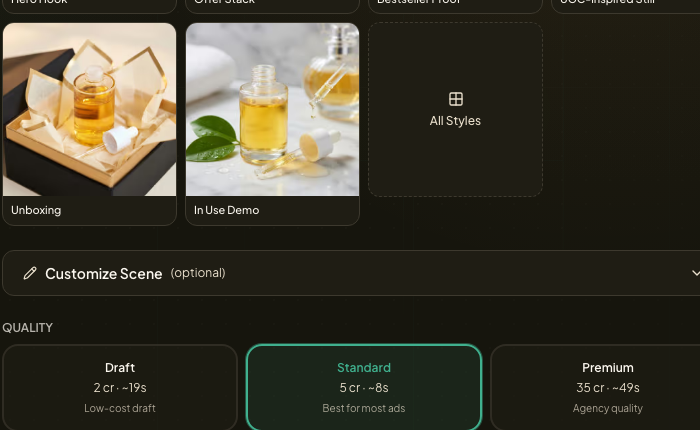
Use Draft for low cost exploration. Use Core when you want a stronger test while keeping spend low. Use Standard for most publishable tests. Use Pro or Premium when the product has fine details, premium finish, text rendering needs, or stricter fidelity requirements.
Completed generations that miss the creative direction are usually a setup, source image, prompt, or tier issue rather than a failed job. If the job failed, got stuck, completed with missing outputs, or the credit balance looks wrong after an error, use Troubleshooting failed generations.
If many generations fail in a row, stop retrying and use Troubleshooting failed generations before contacting support with the batch link, source image, selected tier, prompt, and approximate time.
Should I always use the highest tier?
No. Start lower when exploring. Move up when product fidelity, fine detail, or final advertising polish matters more than credit cost.
