Campaigns collect related assets around a product, goal, or creative push. Use them when you need context beyond a single image.
Use this guide when
you want to review a campaign pack, decide whether older creative needs a refresh, or start another campaign direction.
Before you start
Have the campaign goal in mind. Refresh decisions are strongest when you compare creative age with actual ad performance, seasonality, offer changes, or positioning changes.
For a repeatable operating rhythm, see Plan a creative refresh cadence.
Review campaign packs
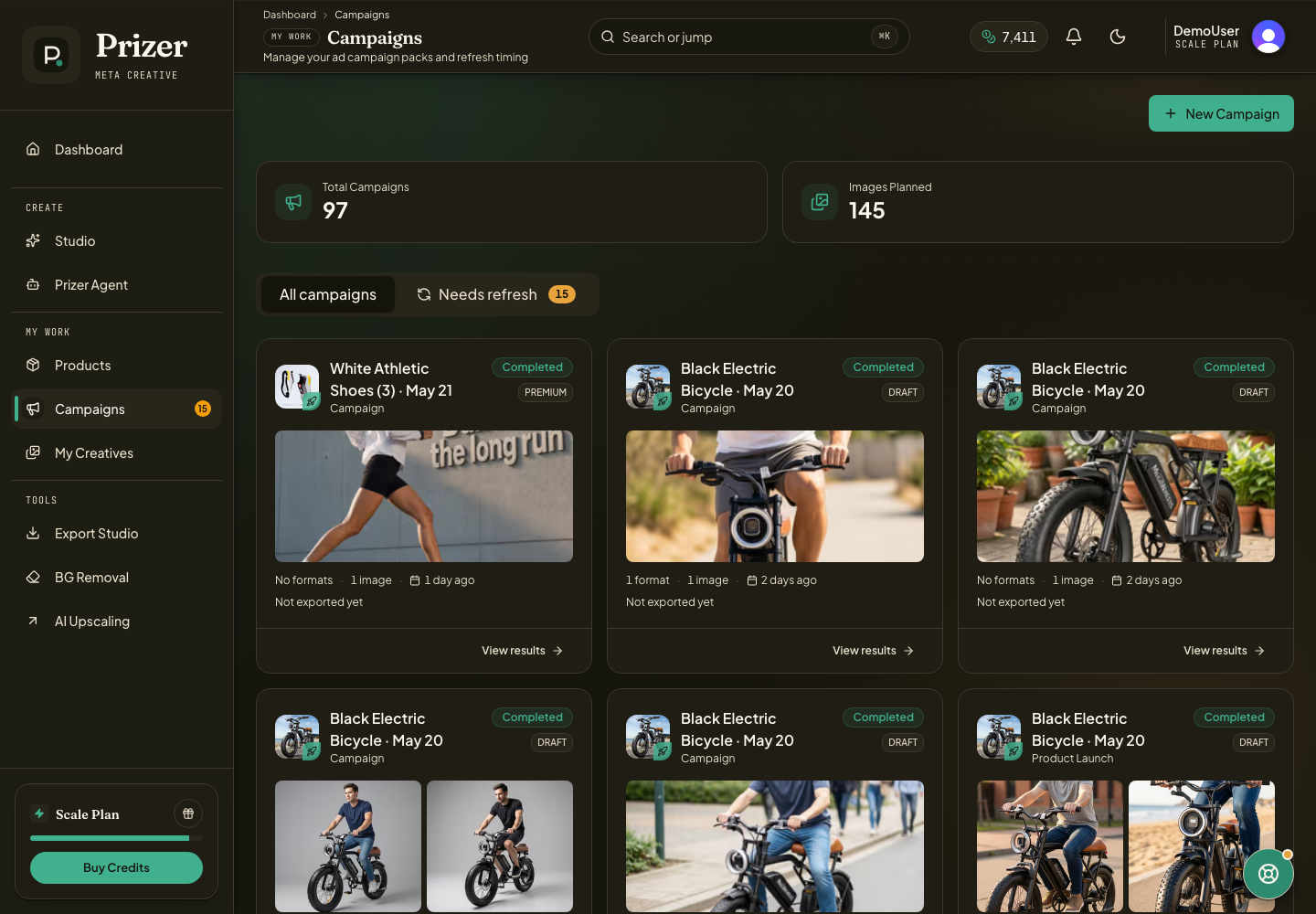
Open Campaigns from the dashboard navigation.
Use All campaigns to review recent campaign packs.
Use Needs refresh to find older completed campaigns that may be ready for new creative.
Open a campaign to inspect images, copy, placement context, and export options.
Create a new campaign from Full Campaign when you need a fresh set of ad concepts. See Build a Full Campaign for setup guidance.
Refresh wisely
Refresh a campaign when the winner is getting tired, the season has changed, the offer is different, or the product positioning has shifted. Do not refresh just because the campaign is old if the creative is still performing well.
Prizer can help make new creative candidates, but ad platform performance decisions should still be based on your campaign data.
What is creative fatigue?
Creative fatigue means an ad may stop feeling fresh to its audience. Prizer highlights older campaigns so you can decide whether new angles are useful.
