Campaign detail pages help you review the creative package around a campaign, not just one image.
Use this guide when
you want to inspect generated images, review or generate ad copy, open the campaign in Studio, or prepare a campaign export.
Before you start
Open the campaign from Campaigns. If you only need a finished asset without campaign context, use My Creatives instead.
Review campaign assets and copy
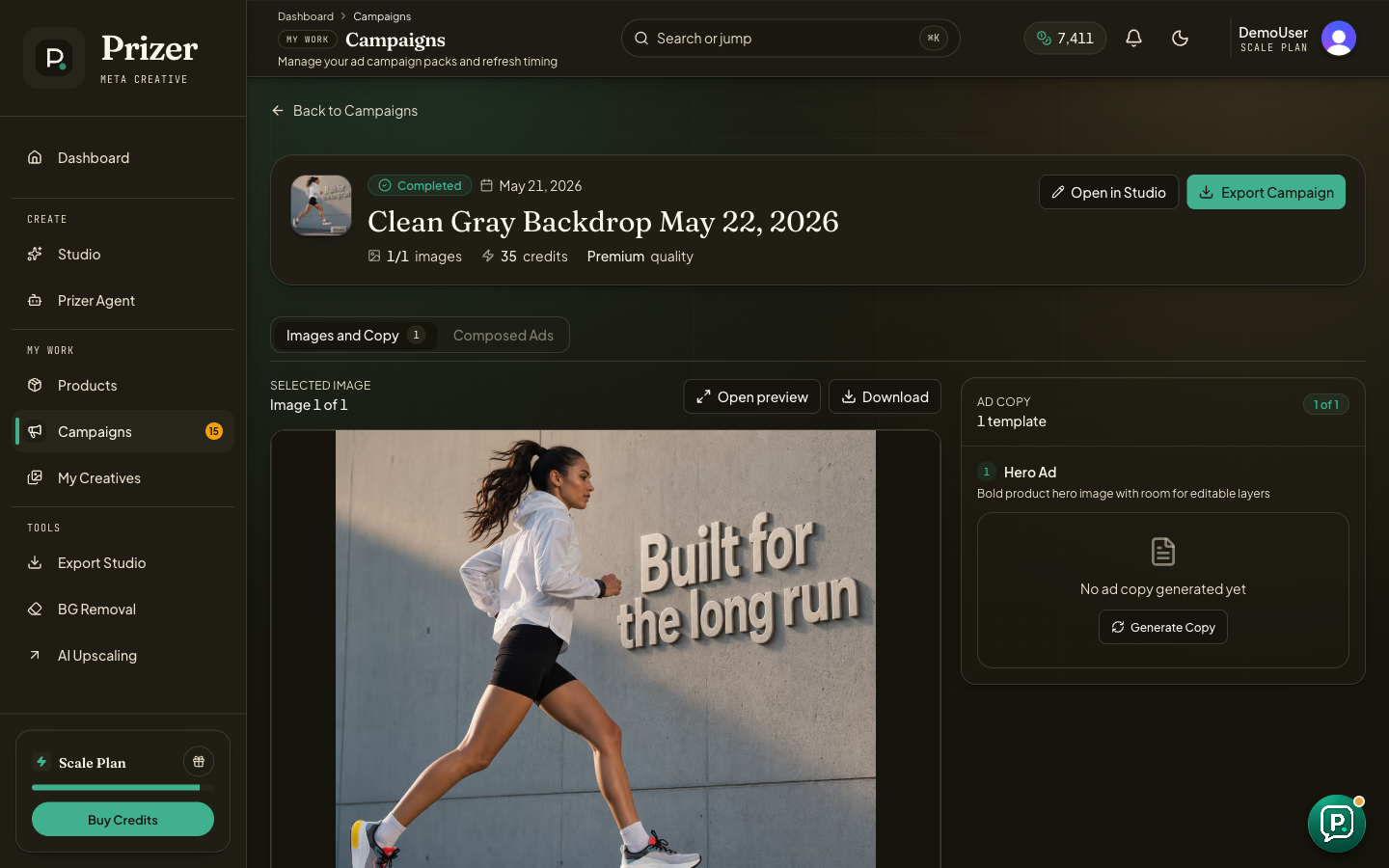
Open Campaigns and choose the campaign you want to review.
Use the image area to inspect selected results and open preview when you need a closer look.
Review the ad copy area. If copy has not been generated yet, use Generate Copy when that action is available.
Click Open in Studio when you need placement, copy, brand, overlay, or export panels for deeper review.
Click Export Campaign when the campaign is ready for handoff.
When to use Studio
Studio is better for editing selected placements, reviewing composed ads, checking copy compliance, and opening Export Studio with the right campaign context. Use the campaign detail page for a faster summary and handoff path.
If ad copy is over a platform limit or a composed asset is not ready, export options may be disabled until the issue is fixed.
Should I edit copy in Prizer or in the ad platform?
Use Prizer to review the campaign direction and handoff copy. Make final platform-specific edits inside the ad platform when legal, policy, or campaign setup details matter.
