Generated assets can be downloaded from the surface where you review them, resized in Export Studio, or packaged from a finished campaign.
Use this guide when
a creative is ready to leave Prizer and needs the right format, size, crop, background, copy CSV, or campaign handoff file.
Before you start
Decide where the file is going. Marketplaces, Meta, TikTok, Pinterest, and internal review decks may need different sizes or formats.
Quick download checklist
Confirm the generation finished successfully.
Open the creative from Studio, My Creatives, Campaigns, or a batch detail page.
Use a quick download when the current file is already the right format and size.
Open Export Studio when you need format changes, platform sizing, crop control, white background, overlays, or bulk ZIP downloads.
Use Export Studio
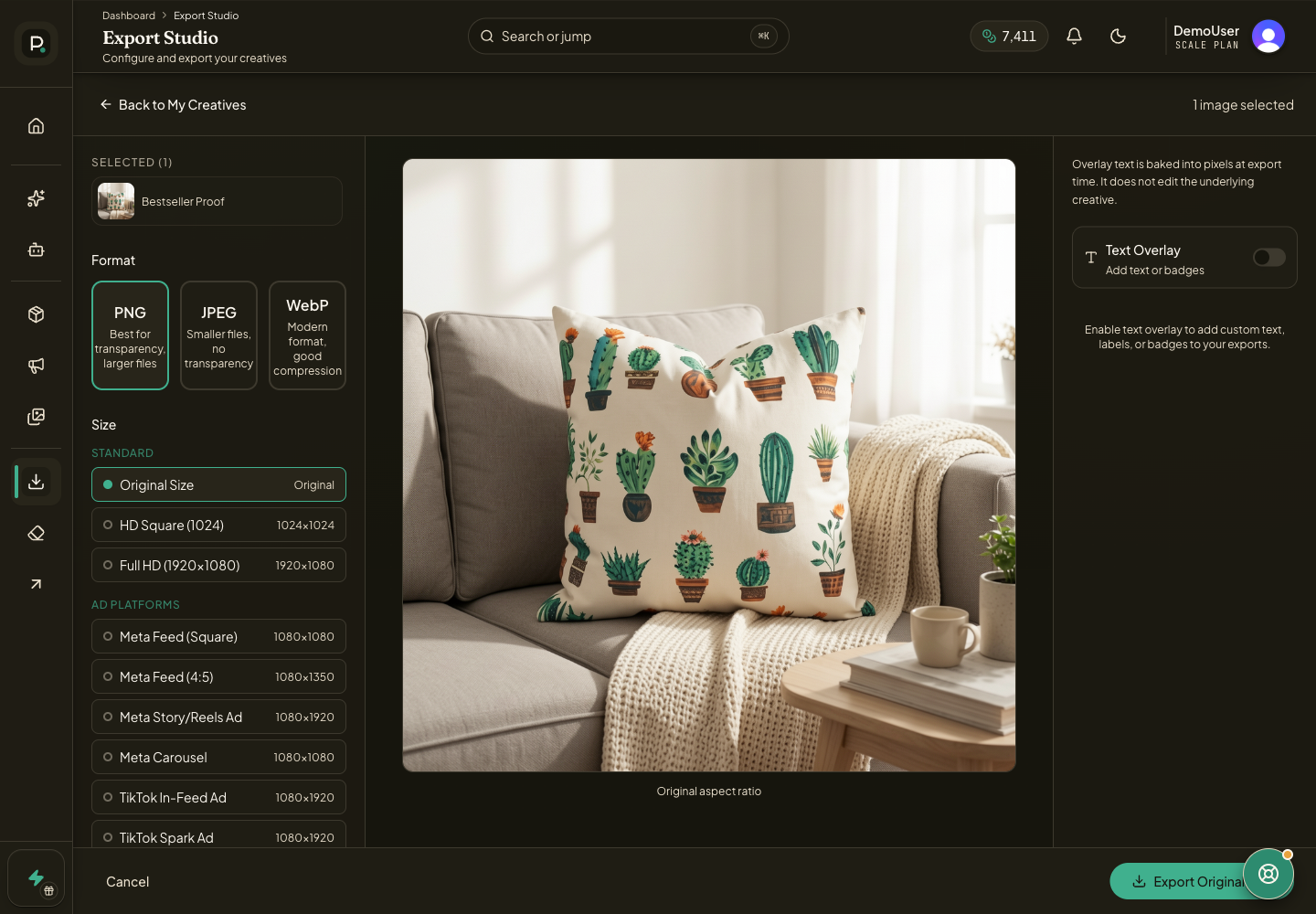
Select one or more finished assets in My Creatives and send them to Export Studio.
Choose PNG when transparency matters, JPEG when you need broad compatibility and smaller files, or WebP when you want modern compression.
Pick a preset size. Prizer includes standard sizes, social sizes, marketplace sizes, and ad platform sizes for Meta, TikTok, Google, Amazon, and Pinterest.
For non-square outputs, choose Fill when the frame must be filled or Fit when the full creative must stay visible with padding.
Turn on White Background for marketplace exports when a clean compliant product image is required.
Export a single file or a ZIP, then open the downloaded file before uploading it elsewhere.
Supported image formats
PNG is best when the asset needs transparency or lossless quality, but files are larger.
JPEG is best for Meta, marketplaces, email, and most upload forms because it is widely supported and compact.
WebP is useful for web pages and modern storefronts when compression matters, but check that the destination accepts WebP before using it.
Supported export presets
Standard presets include Original Size, HD Square, and Full HD.
Social presets include Instagram Square, Instagram Story, Instagram Landscape, Facebook Post, Facebook Cover, Twitter/X Post, Pinterest Pin, and TikTok.
Marketplace presets include Amazon Main, Amazon HD Zoom, eBay, Etsy, and Shopify. Marketplace presets can show the White Background option.
Ad platform presets include Meta Feed Square, Meta Feed 4:5, Meta Story/Reels Ad, Meta Carousel, TikTok In-Feed Ad, TikTok Spark Ad, Google Shopping, Google Display Landscape, Google Display Square, Amazon Sponsored Products, and Pinterest Promoted Pin.
Export ads for Meta
The quick export dialog includes a Meta Ads tab for placement matched JPEG exports. It can download Feed Square, Feed Portrait, Story/Reels, and Carousel Card sizes.
If Prizer warns that a placement is risky, use the free crop path for a simple crop or Native Version when you want Prizer to extend the image for the target placement. Native Version may use credits when enabled.
When selected assets include ad copy, Prizer also downloads a matching copy CSV with Ad Name, Body, Title, Link Description, Call to Action, and Image File Name columns.
Export a campaign handoff pack
Open a finished campaign from Campaigns, then use Export Campaign.
The default handoff pack is a ZIP for manual Ads Manager setup. It includes placement folders, Prizer-Ad-Copy.csv, and Prizer-Upload-Guide.txt.
Use the CSV as a copy and filename reference while creating ads manually. It is not the same thing as the advanced Meta import workbook.
If Meta import Beta is enabled for your workspace, the Meta import tab creates a narrower Ads Manager import pack with a real import template and a matching media folder. Review every imported draft inside Ads Manager before publishing.
If a download fails, use Troubleshooting failed generations if the asset never completed, or Contact support from inside Prizer with the creative or campaign link, desired format, and what happened when you clicked export.
Why do export options differ by workflow?
Some surfaces offer quick downloads, while campaign and export surfaces can include broader handoff options such as copy files or placement matched outputs.
Can I import the copy CSV directly into Ads Manager?
The regular Prizer-Ad-Copy.csv is for copy and paste handoff. Use the Meta import Beta pack when you need a real Ads Manager template and your workspace has that option enabled.
