Prizer plans include monthly credits and rolling generation capacity. Monthly credits are your balance for the billing period. Rolling capacity controls the pace at which your workspace can spend those credits. For credit costs and balance basics, start with Credits and plans.
Use this guide when
you reached a rolling generation limit, are planning a larger batch, or want to understand the capacity included with each plan.
How rolling capacity works
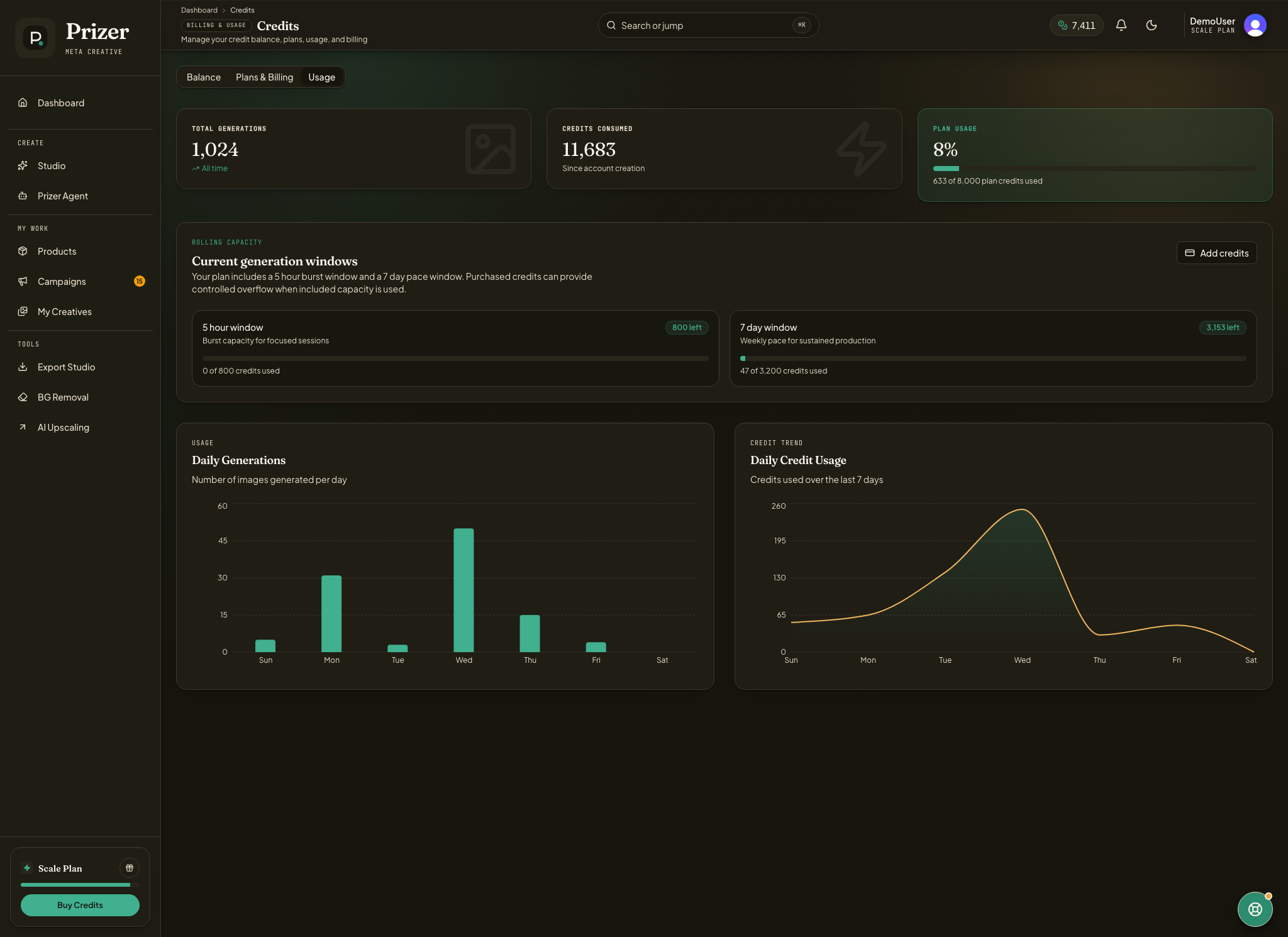
Every credit spending generation or enhancement counts against two rolling windows. The 5 hour window is the burst guard for intense sessions. The 7 day window is the weekly pace limit for sustained work.
You can review both windows from the Usage tab on Credits. The page shows how many credits have been used in each rolling window and how many are still available.
The windows are rolling, not calendar based. Capacity comes back as older usage ages out of the window. If you spent credits at 9:00 AM, that usage starts leaving the 5 hour window around 2:00 PM. Weekly usage drops away as each older hour becomes more than 7 days old.
Current plan limits
| Plan | 5 hour window | 7 day window |
|---|---|---|
| Free trial | 50 credits | 100 credits |
| Starter | 100 credits | 400 credits |
| Growth | 300 credits | 1,200 credits |
| Scale | 800 credits | 3,200 credits |
Growth has 3x Starter rolling capacity. Scale has 8x Starter rolling capacity. These limits apply to the whole workspace, so teammate usage counts toward the same shared plan capacity.
How this relates to monthly credits
Rolling capacity does not replace monthly credits. You still need enough credits for the job, and subscription credits still refresh on the normal billing schedule. Rolling capacity only controls how quickly those credits can be used.
Standard images cost 5 credits each, so the public plan estimates are based on Standard image volume. Higher quality tiers, video generation, video upscaling, larger batches, and premium export work can use more capacity per job.
Purchased credit packs add extra balance for launch weeks, seasonal spikes, and larger production runs. They expire 12 months after purchase and require an active paid subscription to spend. They do not remove payment, queue, account safety, or abuse safeguards, but they can give an active paid workspace more room to keep working after included plan capacity is used.
When a limit is reached
If you reach a rolling limit, wait for older usage to age out, reduce the size or quality tier of the next job, or move to a higher plan if your team regularly needs more capacity.
Support can review unusual launch weeks or production spikes. Temporary workspace adjustments may be possible, but they are reviewed case by case and do not change the public plan limits.
Failed jobs are reviewed from the credit ledger. When credits are returned for an eligible failed job, the related rolling capacity usage can also be reversed.
Do unused 5 hour or 7 day limits roll over?
No. Rolling capacity is not a bank. It refreshes continuously as older usage leaves each window.
Do purchased credits let me keep working after a rolling limit?
Purchased credits can give an active paid workspace more room for additional work after included plan capacity is used. They expire 12 months after purchase and lock if there is no active paid subscription. Prizer may still apply payment risk, queue, account safety, and abuse safeguards, so purchased credits are extra balance and controlled overflow, not unlimited generation.
Why does Prizer use these limits?
The limits keep generation reliable and protect paid workspaces from using a full monthly balance in one accidental or unusually intense session.
